October 14, 20262.0.18
Changelog October 12th, 2026
Claude 5.5 Opus and Haiku joined the model lineup, Skill Runs got its own settings page, and three new recruiter integrations landed for ATS and sourcing teams.

Highlights
Claude 5.5 Opus and Haiku join the model lineup
Claude 5.5 Opus is now available across chat and skills. Claude 5.5 Haiku joined too, as a lighter-weight chat and skill model.
Skill Runs gets its own settings page
Every trigger, scheduled, app event, or chat run now shows up in one unified feed instead of being scattered across views.
Three new recruiter integrations: Greenhouse, Gem, and Juicebox
Recruiting teams can now connect Greenhouse, Gem, and Juicebox directly to Highlight, bringing candidate, requisition, and sourcing context into meetings and automations without leaving the tools they already run their pipeline in.
💬 Chat & AI (2 more updates)
-
The End of Day Recap skill was improved to provide more of a scan instead of a scroll experience.
-
When Highlight sends a draft action to Slack for approval (a Slack card), you can now edit its text right there before approving it, instead of having to open Highlight first.
🔗 Integrations (2 more updates)
-
Approved Slack actions get confirmed back in the thread with a link to the result, so you can verify what actually happened without leaving Slack.
-
The Linear toolset can now link Slack messages and URLs directly to issues.
🔧 Fixes & Improvements (8 fixes)
- Fixed: Meeting speaker labels no longer jump to the wrong person when Recall reconnects to Deepgram mid-call.
- Fixed: Meeting brief links to Notion pages now show the page's actual title instead of a raw link.
- Fixed: The Slack bot's working reactions now clear properly when a mention ends without a reply.
- Fixed: Disconnected integrations stopped reappearing in the list after you disconnect them.
- Fixed: The Settings integrations page no longer shows an app as expired when a newer connection for it is still valid.
- Fixed: The builds panel looks right in light mode again.
- Fixed: The standalone chat preview wraps long text instead of clipping it.
- Fixed: The For You feed refreshes properly after a staged action changes.
August 15, 20261.3.12512.0.01.3.534
Less noise. More Highlight.
We've really appreciated all of the feedback you've been providing — it has directly shaped what we've built. The short version: a unified panel with more control over arranging and resizing, and better interactions for actions and meetings.
Sidepanel & UI
- The split-drawer layout is gone. The side panel is now a single unified pane, collapsing what used to require clicking between separate layers into one view. If the navigation friction was getting to you, this is the fix.
- Sections can be collapsed individually, so you can focus on what needs your attention right now and hide everything else.
- The entire side panel is resizable. Drag the edges to give it more or less room (width and height), and it will hold whatever you set.
- Sections are rearrangeable. Put your most-used section at the top to keep it front of mind.
- Pinning the panel to the screen is now in the top header (look for the small pin icon).
Meetings
Meeting controls and your live transcript now live in the same view. No more navigating between them mid-call.
Actions & Reminders
- Actions and reminders now expand on hover — the panel stays condensed by default and shows full context when you mouse over any item.
- We've renamed "Actions" to "Ready for you." Because it's not just a list to check off — it's the last 10% that needs your eyes before it goes out.
Let us know what you think!
August 3, 20261.3.530
Changelog July 28th, 2026
Your mic is one person, your drafts sound more like you, and the sidepanel finally listens to your mouse.

🎙️ Meetings
-
Switching your mic input device mid-meeting no longer splits your transcript into multiple speakers. You stay labeled as one person, start to finish.
-
Meeting note summaries stop truncating mid-sentence when your recording includes quoted speech. The generation pipeline was replaced at the root, so this one won't come back.
💬 Chat & AI
-
When attaching a window to your chat with Highlight, it now pulls in the full text, not just what's visible on screen — so content scrolled past the fold actually reaches the model.
-
Action cards now show the real source: the actual chat or meeting title instead of a generic "Chat" or "Meeting" label.
-
Edit, copy, and feedback controls have moved into a floating cluster at the drawer's bottom left.
-
Staged-action drafts sound even more like you from the first line. We tuned how your writing style — tone, banned tokens, audience register — gets front-loaded into the drafting agent, so first drafts need fewer corrections to sound right.
📋 Sidepanel & UI
-
Your mouse's back and forward side buttons now navigate the drawer stack — same behavior as Cmd+[ and Cmd+].
-
The integration icons in Data & Privacy settings no longer flicker when you open the tab. They're bundled now instead of fetched from a CDN, and the GitHub icon — which had been a permanent broken image — is fixed.
-
The Profession/Role field in Account settings is now a dropdown of canonical roles instead of a free-text box. Free-text entries were silently breaking role-based skill recommendations: the backend matches stored occupation strings exactly, so anything typed freeform wasn't actually scoping your defaults. Your existing value still shows in the closed dropdown until you pick from the list.
⚙️ Skills
-
Edited default skills stay in the Default section instead of migrating to Custom.
-
Webhook-triggered skills can now be scoped to fire only on events assigned to you, that mention you, or that you authored — so they stop running on every event in the queue.
-
Claude Opus 5 is available as a model option.
🔧 Fixes & Improvements
- Fixed: Highlight no longer jumps to a different monitor when your cursor crosses the seam between displays — edge activation now fires only from the true outer edge
- Fixed: onboarding no longer silently drops your "day-to-day" role selections
- Fixed: the staged action planner is better calibrated on when to suggest vs. stay quiet
- Free users viewing a saved meeting note with no summary now see the upgrade prompt instead of a dead-end "Summary not available"
July 21, 20261.3.529
Changelog July 21st, 2026
Plans are smarter, staged actions no longer drop your last words, meetings run lighter, and Ashby is easier to connect.

🔌 Integrations
Ashby is easier to connect now, with a simpler OAuth setup. If you had it connected the old way, you'll get a prompt to reconnect.
📋 Sidepanel & UI
You can now drag your sidepanel to either screen edge — resize, peek, and gestures all adjust automatically. Your custom section order (Upcoming, Actions, History) also sticks now, instead of resetting every time you open the app.
💬 Chat & AI
Plan mode is smarter. Plans now show exactly which services they'll touch, prompt you to connect anything missing, and let you review the exact text of anything about to be sent before it goes out. Highlight is also better at catching your post-meeting commitments — if you promise to send a doc or Slack message on a call, that follow-up now shows up in your actions panel once the meeting ends. It also has better access to your Linear projects, pulling in full context when drafting updates.
🔋 Performance
Meetings are lighter on your machine — we cut the background work that was keeping your CPU busy while you chat.
🔧 Fixes & Improvements
- Fixed a bug causing staged actions to miss the most recent thing said in a meeting
- Notion writes with invalid property values now fail early with a clear error instead of crashing
- Model routing for deprecated GPT and o-series models is fixed, which also restores meeting brief generation
- Integration brand marks are now consistently styled across the app
- Fixed an "invalid provider" error during OAuth setup for new integrations
- Skill creation now understands cron schedules and event triggers — ask Highlight to run a skill on a schedule or when something happens
- Meeting notes now link to the correct calendar event more reliably, even in back-to-back meetings
- External links and internal resources now use standard security protections (HTTPS)
July 8, 20261.3.526
Changelog July 8th, 2026
Meeting recordings work more reliably. Your sidepanel is customizable. Your activity history loads faster. And a few things that were cluttering the experience are gone.

🎙️ Meetings
Your recordings should start, stop, and pick up the right participants more consistently — especially in back-to-back meetings. The app now stays properly attached to a session across its full lifecycle, so fewer meetings end prematurely or get attributed to the wrong note.
📋 Sidepanel
You can now drag and drop sections to reorder their sidepanel. The layout is yours to set.
🕒 History
Your recent activity — chats, meeting notes, and completed actions — is now faster and more accurate, and scrolling back through older items now works without gaps.
✨ Skills
Default skills now update automatically when you change your job role in settings, so the right skills show up for the work you’re actually doing.
🔧 Fixes & Improvements
- Meeting notes that were sometimes arriving incomplete now come through in full
- Slack messages sent by Highlight now deep-link back into the app correctly instead of landing on a broken URL
- The onboarding setup screens for Accessibility and Screen Recording have clearer, shorter explanations of what each permission actually does
- The skill selection step in onboarding is now managed server-side, so new users see the most relevant skills from the start
- The keyboard shortcut hint in the reminders input was overlapping the text field — fixed
- Several edge cases where the wrong meeting got attached to a note — or where the app failed to detect a meeting ending — have been resolved
July 1, 20261.3.525
Changelog July 1, 2026
Sidepanel controls you can actually tune, meetings that capture more reliably, and a long list of fixes that make day-to-day feel more solid.
📋 Sidepanel
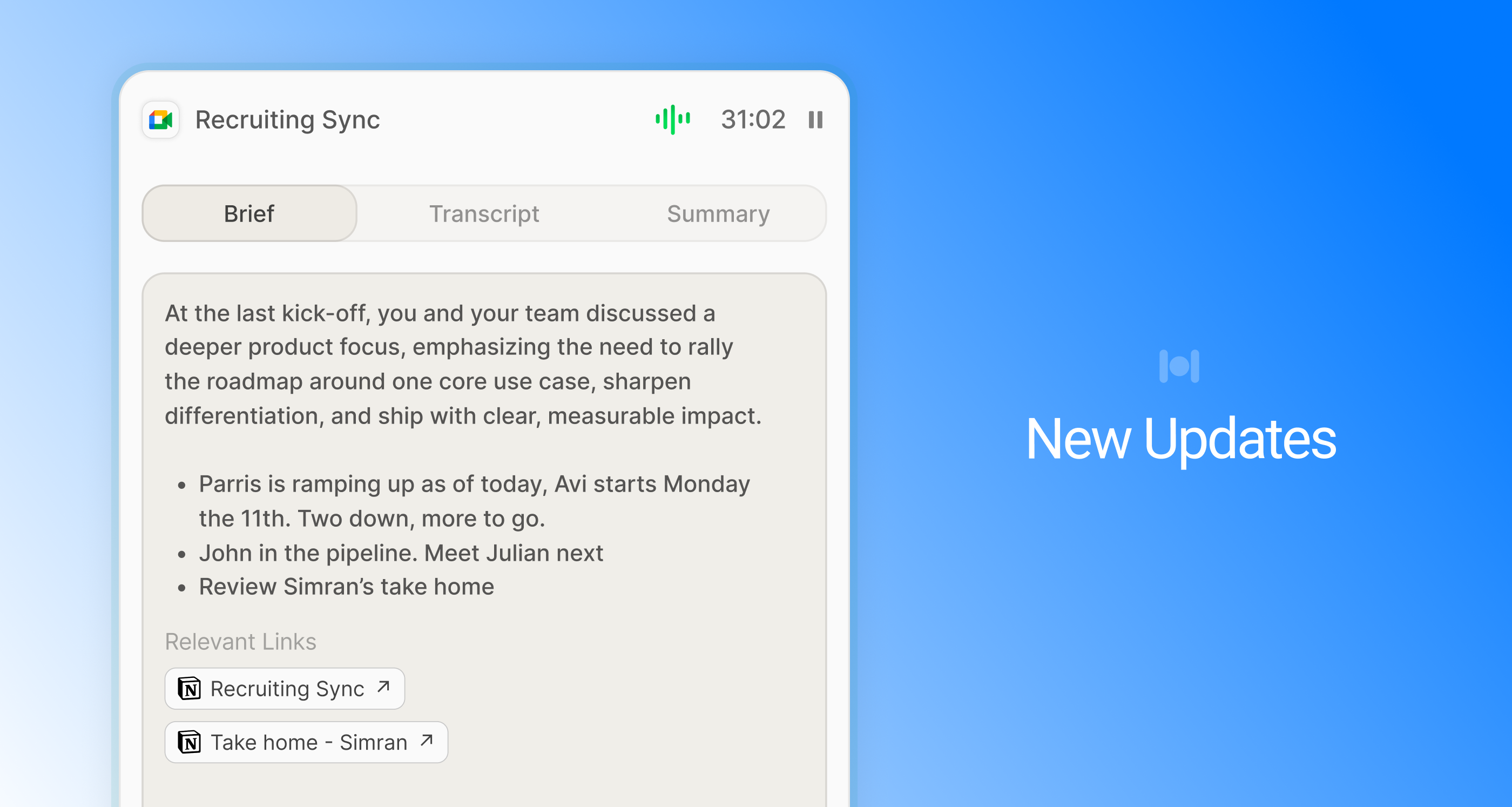
Tune the peek to your hand: a new edge sensitivity slider controls exactly how close your cursor needs to get to trigger it. The trigger now sits pinned to center instead of chasing your cursor vertically — and you can toggle it off in settings if you'd rather.
The clickable area is now scoped to the panel's actual content, so no more accidental taps on empty space.
🎙️ Meetings
Slack huddles now record natively through the app — no third-party SDK in the middle.
Your mic behaves the way you'd expect: it stays muted when you tab away mid-meeting, and no longer blips during brief Google Meet accessibility events.
Your summaries come through whole. They were sometimes getting silently cut off; now they arrive in full. And you show up correctly labeled as yourself in your own transcripts.
Plus a round of smaller detection and recording reliability fixes working quietly in the background.
💬 Integrations
Watch work happen: live progress now shows in chat while a Claude Code or Conductor session is running.
Notion got more dependable, too — people and relation property writes now save correctly with proper ID validation, and you can finally insert content at the top of a page.
🐞 Bug Fixes & Polish
- Fixed: notes imported from Granola now appear in search immediately (previously took up to 10 minutes).
- Fixed: auth edge cases that could cause sign-out or token-refresh failures.
- Fixed: the app was returning an error for some users when loading conversation or meeting note history.
- Fixed: scheduled skills now correctly attribute to the skill — not to you.
- Action CTAs are now always shown in yellow for easier scanning.
- Fixed: text selection within action cards now works correctly.
- Improved load times for your conversations and meeting notes list.
June 24, 20261.3.9491.3.523
Better Meetings, Scheduling, Chats & more
This version is all about the details: scheduling that shows you when people are actually free, meeting capture that works in more browsers, a calmer auto-update experience, and a long list of fixes that make day-to-day Highlight feel more solid.
Big week and a lot of it came straight from your feedback. Thank you. Here's what you'll notice:
🎙️ In your meetings
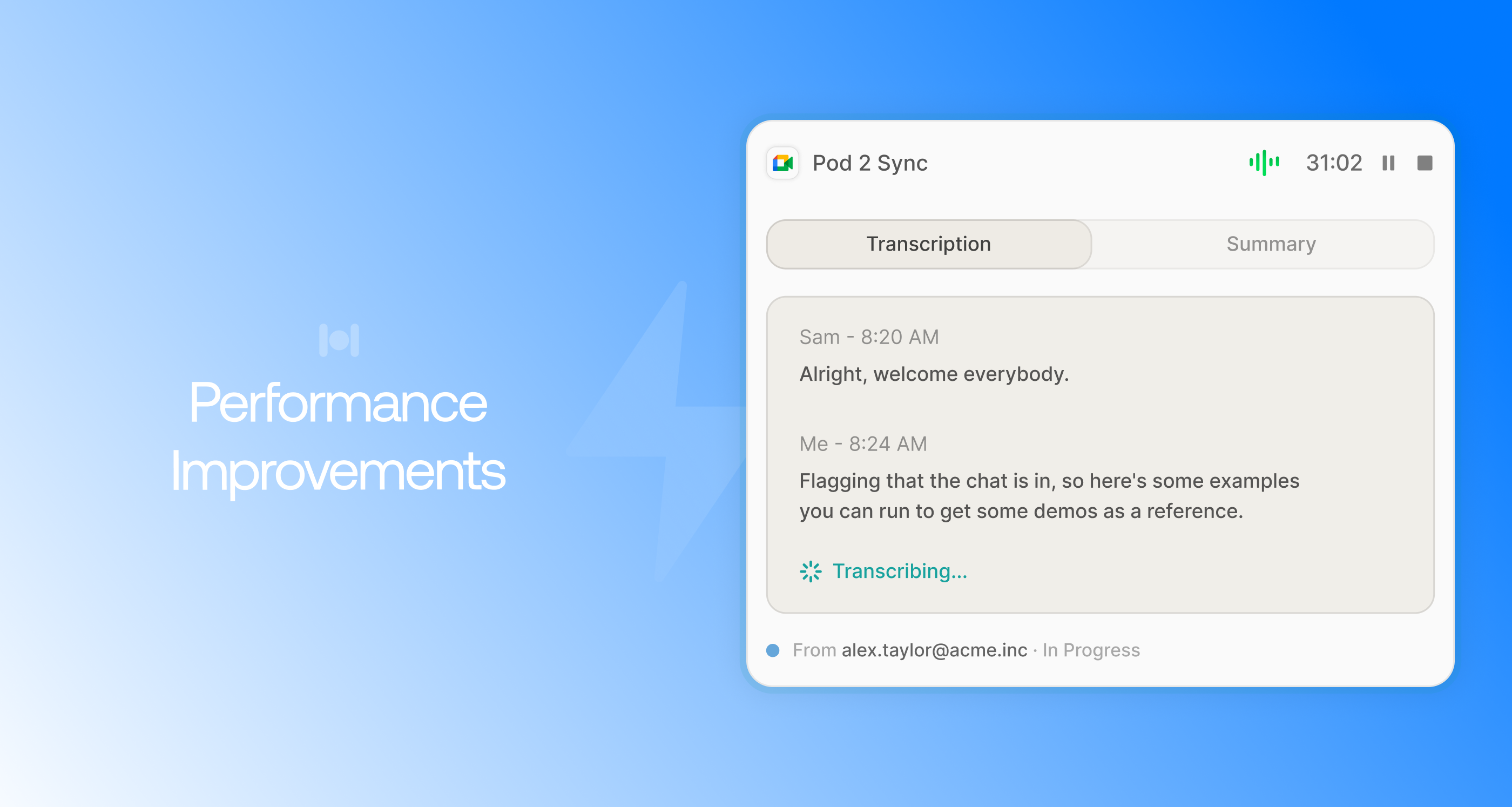
Your recording keeps going, period. App updates now wait until you're done, and a dropped connection no longer means a lost recording; the action recovers when you reconnect.
We detect more of your meetings automatically. Firefox, Teams and Edge now join Chrome and Arc, so you're not manually starting recordings anymore.
Back-to-back calls save as separate notes instead of merging into one transcript.
Recording feels more alive and obvious: a live waveform shows in the toolbar while you're recording, the active meeting floats to the top of your list, and the transcript appears in the drawer the moment recording ends.
Fewer interruptions: no surprise screen-share re-prompts mid-session, and granting mic access now starts recording right away instead of making you do it twice.
📅 When you schedule
See everyone's availability before you hit send — free/busy now shows for each invitee right in the time editor. And your attendees actually stick: guests are no longer dropped when you save.
💬 Chat
Pick up where you left off — chats restore on reopen instead of going blank. "Ask me a question" notifications now jump you straight to the exact message.
📝 Actions
See exactly what will change before you approve it: edits show a strikethrough diff, and Linear status changes show the full before → after. Archived actions collapse out of your way, and you can dismiss a suggestion right from its toast.
🤖 Models
If your default model gets retired, we switch you to a current one automatically and tell you.
🐞 Bug Fixes & Polish
- Fixed crashes in the app's screen-reading layer affecting some users (accessibility API type mismatch).
- Context window chips no longer flash or re-animate when an app updates its title rapidly (notably Claude Code during thinking states).
- Sidepanel card drop shadows now render cleanly at the edges instead of clipping.
- Share link now works on the first click for newly created chats.
- Support chat widget is now fully clickable from the overlay window.
- Fixed scroll jumping when editing long skill instructions.
- Onboarding: screen recording permission step now shows the exact macOS section name so you drop onto the right one.
- Updated integrations banner copy and demo action labels for clarity.
June 24, 20261.3.5191.3.522
Granola, Gmail & a smarter Highlight
We've added new integrations with Granola, Gmail, and Google Docs plus a solid round of improvements and bug fixes.
🧩 Productivity & Integrations
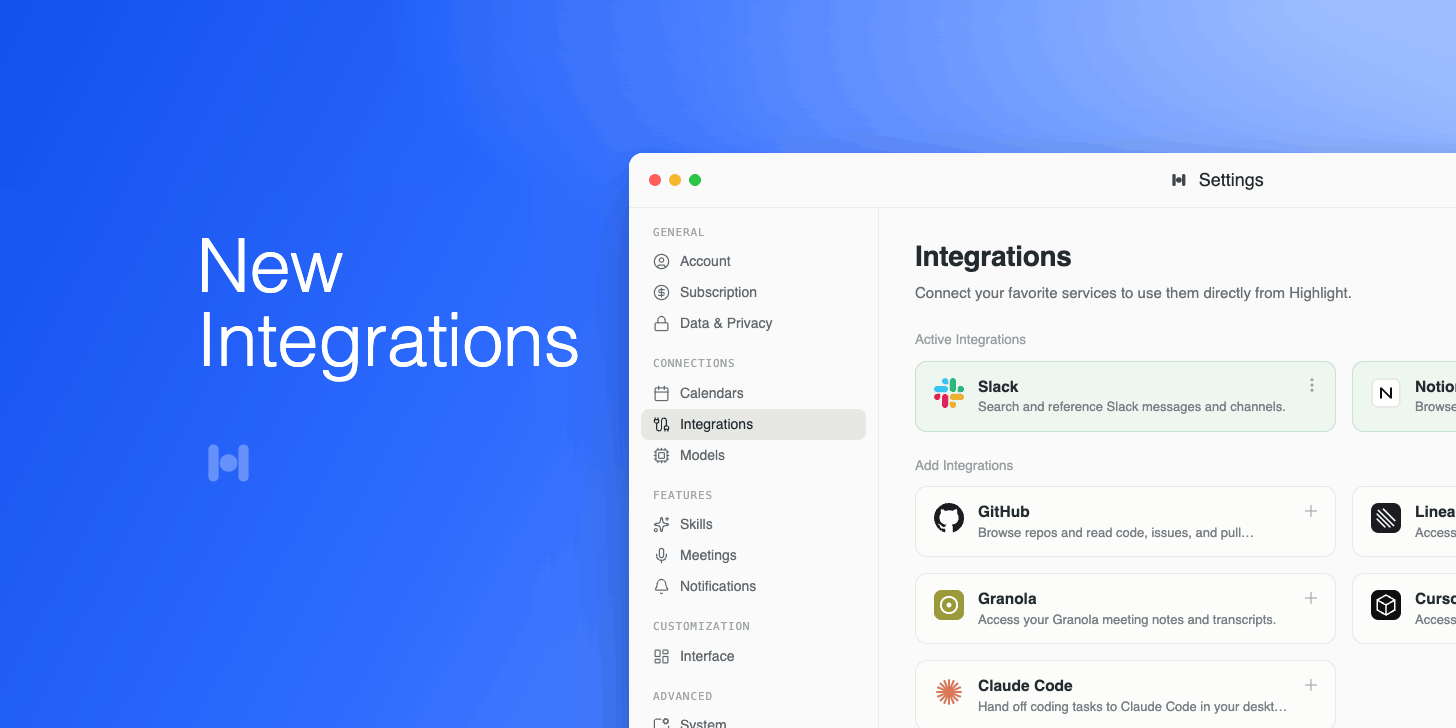
Granola import is here. If you use Granola for meeting notes, you can now connect it directly to Highlight. Once connected, Highlight reads your Granola notes and puts them to work capturing reminders, kicking off skills, or drafting follow-up actions on your behalf.
Here are some other integration updates:
- Gmail & Google Docs integration. Highlight can now read and act on your Gmail and Google Docs. Reach out to us and we'll get it enabled for you.
- Edit calendar invites. Drag and resize events, switch timezones, and adjust start and end times before sending.
- Meeting summary improvements. We’ve made it easier to see summaries for past meetings, and made stability changes to improve meeting briefs.
- Reminder confirmations. Get a toast confirmation the moment a reminder is created.
🔒 Privacy & Intelligence
You're now in full control of what Highlight sees. We've also made meeting capture smarter, so it handles tricky audio setups without missing a beat.
- Privacy filtering. Set rules per app, domain, or content type to control exactly what Highlight can see.
- Smarter mute detection. Highlight pauses your mic transcription automatically when you're muted on Zoom or Meet.
🐞 Improvements & Bug Fixes
Lots of small things that add up: a cleaner settings experience, a snappier sidepanel, and a few workflows that just feel more polished now. Here are a few worth noting:
- Action sources. Sidepanel actions now show which app they came from.
- Multi-monitor support. The sidepanel follows your cursor. Edge-push works across all connected screens.
- Pinning chats. Pin any chat or action to the top of your history.
- Demo actions. New interactive prompts in the sidepanel to help you discover what Highlight can do.
We squashed a good number of bugs this cycle. Here are the ones most likely to affect your day-to-day.
- Pressing Enter in the feedback input no longer accidentally executes the action.
- Brief chat no longer interrupts a response that's still streaming in.
- Fixed duplicate calendar events appearing when the same meeting synced from multiple calendars.
- Recordings always save. Auto-save now kicks in so notes never end silently.
- Skill instructions now save even when you click away without focusing the field.
- Fixed Granola sign-in being blocked during connection.
- More reliable auto-updates, plus security and stability improvements under the hood.
May 21, 20261.3.7942.0.01.3.512
Everything Is a Skill Now
It's been a while. We know you missed us. Big one this time, lots has landed since the last update. Here's a run down of all the new features.
Skills
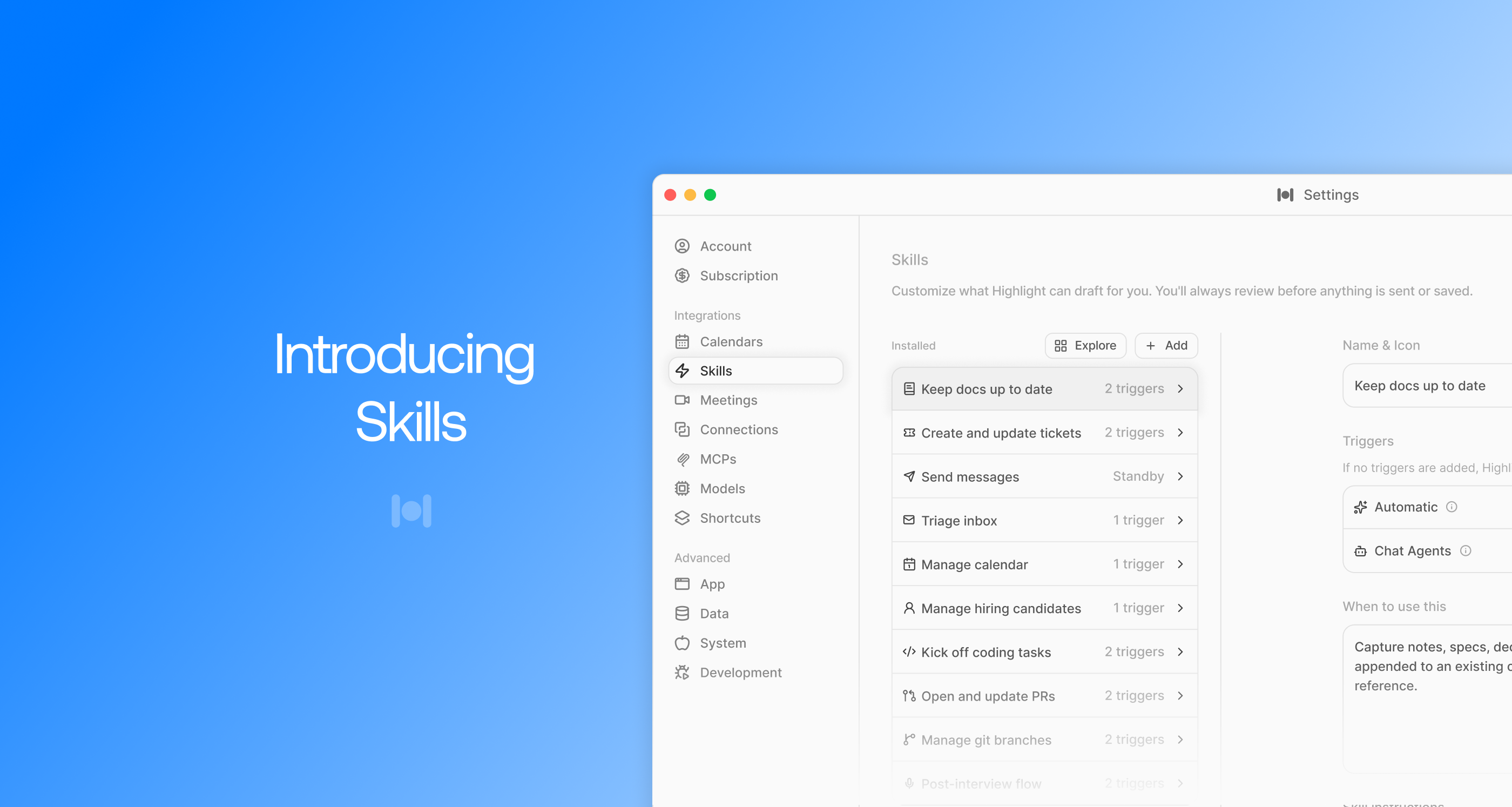
Skills is the new foundation for everything Highlight does for you. Highlight can also now build you skills directly in chat.
Every automatic behavior - post-meeting summaries, reminders, action suggestions - is now a skill you can see, edit, disable, or replace.
The settings panel has been fully redesigned with a sidebar list and detail view. You can browse all active skills, click into any one to configure it, and toggle off anything you don't want.
New capabilities
- Scheduled skills - set any skill to run on a cron-style schedule. Example: "generate a standup draft every weekday morning at 9am", or "send a weekly summary every Friday at 5pm".
- Meeting skills - skills that fire automatically when a meeting ends. Example: "draft a follow-up email, extract action items", or "update a Linear ticket with what was discussed".
- Build from chat - describe a skill in plain language and Highlight will create it. You can also ask Highlight to modify existing skills the same way.
- Slash command - type / in the chat input to pull up a skills-only suggestion menu and invoke any skill by name.
- Turn off defaults - don't want Highlight summarizing every meeting? Turn it off. Every default behavior is now individually toggleable.
Meeting Briefs
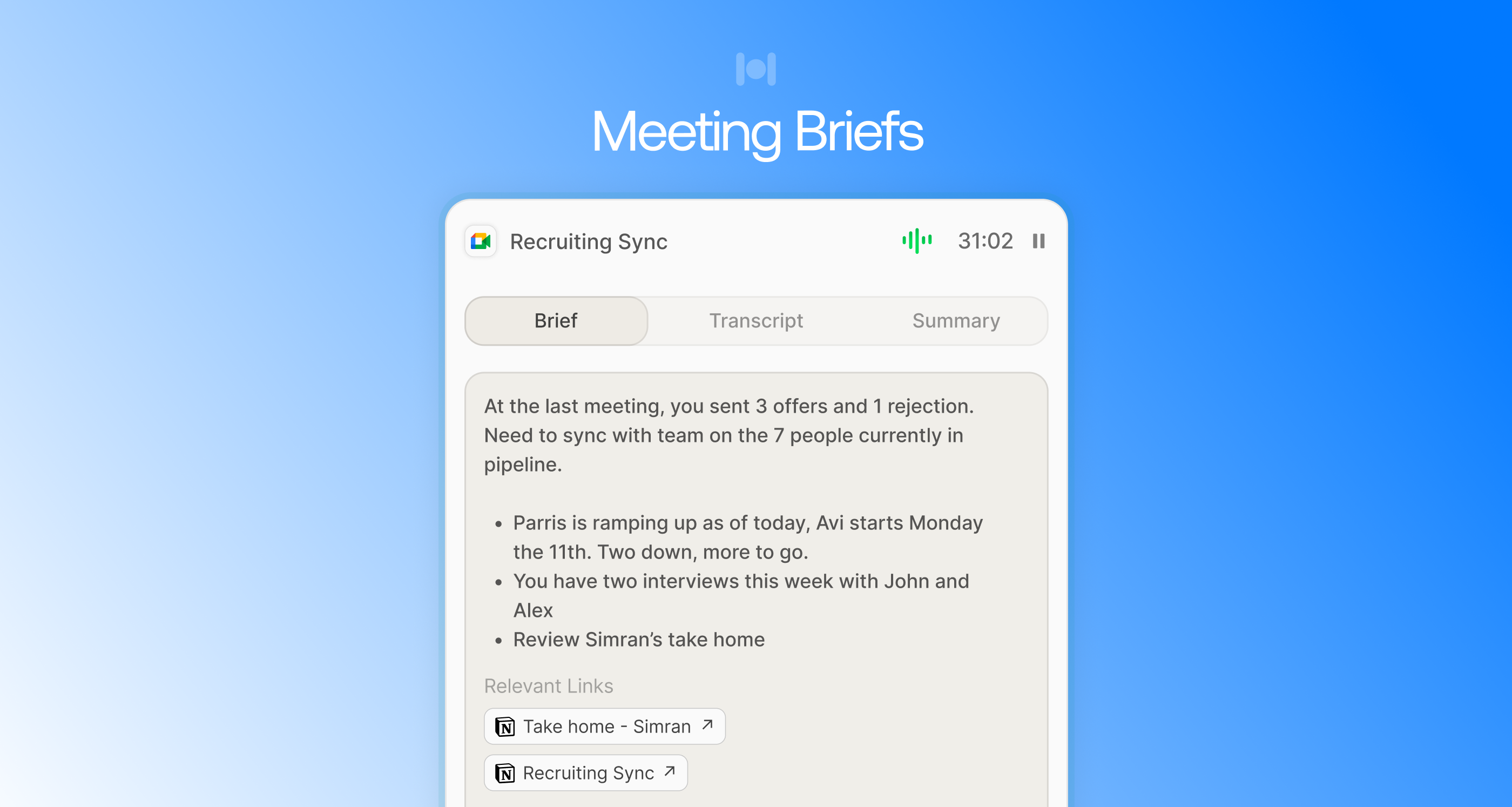
Before every calendar meeting, Highlight now generates a prep brief - a quick summary of who's attending, relevant context across workspace apps and memory, open action items, and useful links to review beforehand.
Briefs are accessible from the Brief tab in any meeting drawer, and a preview appears inline in the 10-minute and 1-minute reminder toasts so you can open them with one tap.
- For recurring meetings, briefs are scoped to the specific occurrence with context seeded from past meetings.
- Future meetings in the sidepanel show a "Create Brief" button to generate one on demand.
- Briefs have links to relevant documents and URLs that might be useful to review before your meeting.
Edit Existing Documents and Tickets
Highlight can now make changes to existing content - not just create new things. Ask it to update a Linear ticket or revise a Notion page and it will open the document, make the change, and show you a preview before applying.
Supported integrations: Notion and Linear.
Multi-Monitor Sidepanel
The sidepanel now opens on whichever monitor your cursor is on, regardless of how it was triggered - hotkey, tray icon, edge push, or gesture. Edge push now also works on every connected monitor, not just the primary.
Improvements
Mic mute detection. Mute yourself on Google Meet or Zoom and Highlight stops transcribing your mic automatically. Other speakers keep transcribing uninterrupted.
Chat auto-resumes after action approval. Approve a staged action with a follow-up? The chat drawer reopens on its own so you never lose your place.
Pin history items. Right-click any chat, meeting note, or action to pin it to the top. Pins survive restarts.
Notion breadcrumbs. Notion action cells now show the full page path so you know exactly what's being updated before you run it.
Overdue reminder badge. The sidepanel badge now shows overdue reminders instead of priority count.
Recurring meeting brief scoping. Briefs for upcoming recurring meetings no longer pull in transcripts from past occurrences.
History filter memory. The history drawer reopens to whichever tab you were last on.
Faster chat loading. The loading indicator appears the moment you submit, eliminating the blank flash before streaming starts.
Action toasts are smarter. Toasts are suppressed only when that conversation is already open, not globally.
Turn any reminder into an action. Every reminder can now be turned into an action by right clicking on the reminder.
Bug Fixes
- Attachments added while editing a staged action were silently dropped. Fixed.
- Google Calendar now updates in the connections list immediately after reconnecting, no restart needed.
- Meeting note titles now use the actual calendar event name.
- Speaker audio from other apps was leaking into mic transcripts on macOS. Fixed.
- On Google Meet, other speakers' audio was being stripped out due to mic processing applied to system audio. Fixed.
- Arc Browser was causing Highlight to miss every Google Meet window. Fixed with an Arc-specific detection fallback.
- A race condition caused crashes when the app received focus events during an update install. Fixed.
- Multiple keyboard hooks across threads were doubling keystroke latency and causing occasional hangs. Consolidated into one.
- A billing state race condition could cause long recordings to save incorrectly or not at all. Fixed.
May 21, 20262.0.0
Highlight — Smarter focus, faster context
Welcome to one of our biggest releases yet. Highlight 1.41 doubles down on the
two things people tell us they love most: getting answers about whatever you're
working on, and doing that work right inside the assistant. We rebuilt the
overlay, taught the magic dot to read the room better, and shipped a long list
of integrations and quality-of-life improvements suggested directly by the
community.
TL;DR
- A redesigned overlay with multi-pane focus mode, faster keyboard navigation, and a refreshed look.
- Audio notes now transcribe in real time and summarize when you stop the recording.
- Linear, Notion, and Slack can now be used as both sources and targets — ask questions, then file the answer.
- MCP agents are out of beta. Install once, use everywhere.
- Hundreds of smaller fixes across macOS and Windows.
If you only have 30 seconds: try ⌘ + . (or Alt + . on Windows) to open the
new overlay, drop in a question, and press Tab to pivot to a follow-up
without losing your place.
✨ What's new
Multi-pane overlay
The overlay is no longer "one box you type into." It's a workspace.
- Pane snapping — drag any answer to the side to keep it in view while you ask the next question.
- Linked context — answers in side panes stay aware of each other. Ask a follow-up in the main pane and Highlight will pull from the pinned panes automatically.
- Pin & forget — pinned panes survive across sessions until you dismiss them with
⌘ + W.
Keyboard shortcuts you'll actually use
| Action | macOS | Windows |
|---|
| Open overlay | ⌘ + . | Alt + . |
| Pin current answer | ⌘ + Shift + P | Ctrl + Shift + P |
| Cycle pinned panes | ⌘ + ⇥ | Ctrl + Tab |
| Send to selected app | ⌘ + Enter | Ctrl + Enter |
| Dismiss everything | Esc (twice) | Esc (twice) |
Real-time audio notes
Recording a quick voice note? Highlight now transcribes as you talk and, when
you stop, generates a structured summary tailored to what you said — meeting
recap, todo list, brain dump, or freeform notes.
- Local-first transcription on Apple Silicon and modern Windows machines (no audio leaves your device).
- One-click handoff to your favorite notes app — currently Notion, Apple Notes, and Obsidian.
- Long recordings (>1 hour) are chunked automatically. No more frozen progress bars.
Magic dot, smarter
The magic dot used to be a launcher. Now it's an ambient assistant. It
glances at what's on screen (with your permission) and surfaces:
- The best action for what you're doing right now.
- A live count of unread messages in connected apps.
- Quick context handoff into chat with a single click.
Privacy note: nothing is sent off-device unless you click. The dot's signals
come from on-device accessibility APIs you've explicitly opted into. You can
disable any of these at any time in Settings → Privacy → Magic Dot.
🧩 Integrations
Linear, Notion, Slack — now bidirectional
Ask a question that touches one of these apps, and Highlight will offer to
send the answer back to the right place.
- "Summarize this thread" → Slack reply or canvas
- "Draft a spec for X" → Notion page in the workspace you picked
- "Open issues blocking the 1.41 release" → Linear filter + the option to comment
MCP agents are out of beta
The Model Context Protocol integration is now stable. Install an MCP server
once from the new directory and it's available across every conversation —
including ones triggered by the magic dot or audio notes.
highlight mcp install https://example.com/your-mcp-server
A few of the agents we've been testing with internally:
- GitHub Reviewer — open a PR URL, get a structured review.
- Postgres Inspector — describe a query and have it run safely in read-only mode.
- CalDAV — calendar awareness without giving Highlight full access to your account.
Want to ship your own? See the MCP authoring guide.
App SDK 2.0
If you build apps on Highlight, the SDK got a major refresh:
- New
useContext() hook with strongly-typed permissions.
- A streaming variant of
inference() that returns an AsyncIterable.
- Vector store queries are now ~3× faster on average.
- The
permissions.json schema has its first breaking change since launch — see migration notes.
🛠 Improvements
- The chat input now supports multi-file drag and drop. Drop a folder and we'll do the right thing.
- Sidebar collapses on narrow displays automatically (and remembers your last setting per monitor).
- Streaming responses now render code blocks incrementally instead of waiting for the full response.
- Conversations can be renamed inline (
F2) and starred for quick access.
- Search across history is now fuzzy and ~10× faster on large libraries.
- The settings UI was reorganized into clearer sections; nothing was removed, just easier to find.
- New onboarding tour for first-run users that takes about 90 seconds and highlights the things people commonly miss.
Accessibility
- Full keyboard navigation across the overlay, sidebar, and settings.
- ARIA labels added to every actionable element in chat.
- A new high-contrast theme (toggle in
Settings → Appearance).
prefers-reduced-motion is now respected throughout the app.
Performance
| Metric | 1.40 | 1.41 | Change |
|---|
| Cold start (M-series Mac) | 1.8s | 1.1s | −39% |
| Cold start (Windows, NVMe) | 2.6s | 1.6s | −38% |
| Memory at idle | 420 MB | 290 MB | −31% |
| First-token latency (cloud) | 480 ms | 320 ms | −33% |
| Battery impact (1h idle, M2) | 4.1% | 2.4% | −41% |
🐞 Bug fixes
We closed 214 issues this cycle. The highlights:
- Fixed a long-standing crash when pasting very large images into chat.
- Fixed
the disappearing chat input on dual-monitor setups — it stays put now.
- Hotkeys no longer fire when typing into other apps' password fields.
- The audio recorder no longer keeps the mic indicator on after stopping.
- "Open at login" actually opens at login on macOS Sonoma+.
- Resolved a memory leak when streaming long responses with many code blocks.
- PDF previews render correctly when the file path contains non-ASCII characters.
- Fixed an issue where Slack reactions weren't surfaced in summaries.
- Fixed Linear filters not applying when the workspace had >50 projects.
- The magic dot no longer gets stuck behind full-screen apps after returning from sleep.
⚠️ Breaking changes
We try hard to avoid these, but a few were necessary.
- App SDK
permissions.json — see the migration guide above. Existing apps will continue to work on 1.41 with a deprecation warning until 1.43.
- Legacy hotkeys removed:
⌘ + Shift + H (replaced by ⌘ + .) and ⌘ + Option + N (replaced by audio notes).
- Windows 10 < 21H2 is no longer supported. The app will still launch but new audio features will be disabled.
✅ Settings worth revisiting
Take 30 seconds to look at these — they were either added or significantly improved:
🧪 Beta tracks
Want to live on the edge? You can now switch tracks without reinstalling:
Settings → About → Release channel
- Stable — what you're on now.
- Beta — about a week ahead, generally safe.
- Alpha — daily-ish builds from
main. Expect rough edges.
If you find something broken on an early track, please send feedback via the
in-app button — it now attaches the relevant logs automatically (with your
consent, every time).
🙏 Thanks
This release wouldn't exist without our community. Special thanks to the folks
who filed the issues, recorded the screen captures, and put up with our
"can you try one more thing?" replies. A few standouts:
- @avery — caught the dual-monitor input bug.
- @kenji_dev — proposed the multi-pane overlay design that we ended up shipping.
- @samantha-ops — relentless about the magic dot privacy controls. You were right.
- Every single person who left a 👍 or 👎 on a response — those signals trained the new ranker that decides what the magic dot suggests.
📦 Build notes
- Channels: stable, beta, alpha
- Platforms: macOS 12+ (Intel & Apple Silicon), Windows 10 21H2+, Windows 11
- Auto-update: rolls out over 48 hours starting at noon PT.
- Installer size: ~140 MB (mac), ~120 MB (win).
You can always grab a fresh installer from
highlight.ing/download, or update from the
app via Settings → About → Check for updates.
Verified release checksums
highlight-1.41.0-arm64.dmg   sha256: 6f3a9b…c81e
highlight-1.41.0-x64.dmg     sha256: 1ad24c…be17
highlight-1.41.0-x64.exe     sha256: 9c47fe…0832
One more thing
There's a small, friendly easter egg hidden in the overlay. We won't spoil it.
If you find it, post a screenshot — we'll send you a sticker pack. 💌
— The Highlight team